Urology website design built around private questions and verified answers.
A urology patient usually types the question before saying it to anyone. The site has to answer that question, show which physician and location it belongs to, and offer a next step that never asks for a diagnosis in the open. LA Digital Systems designs urology practice websites around that sequence—and the practice workflow that keeps it accurate.
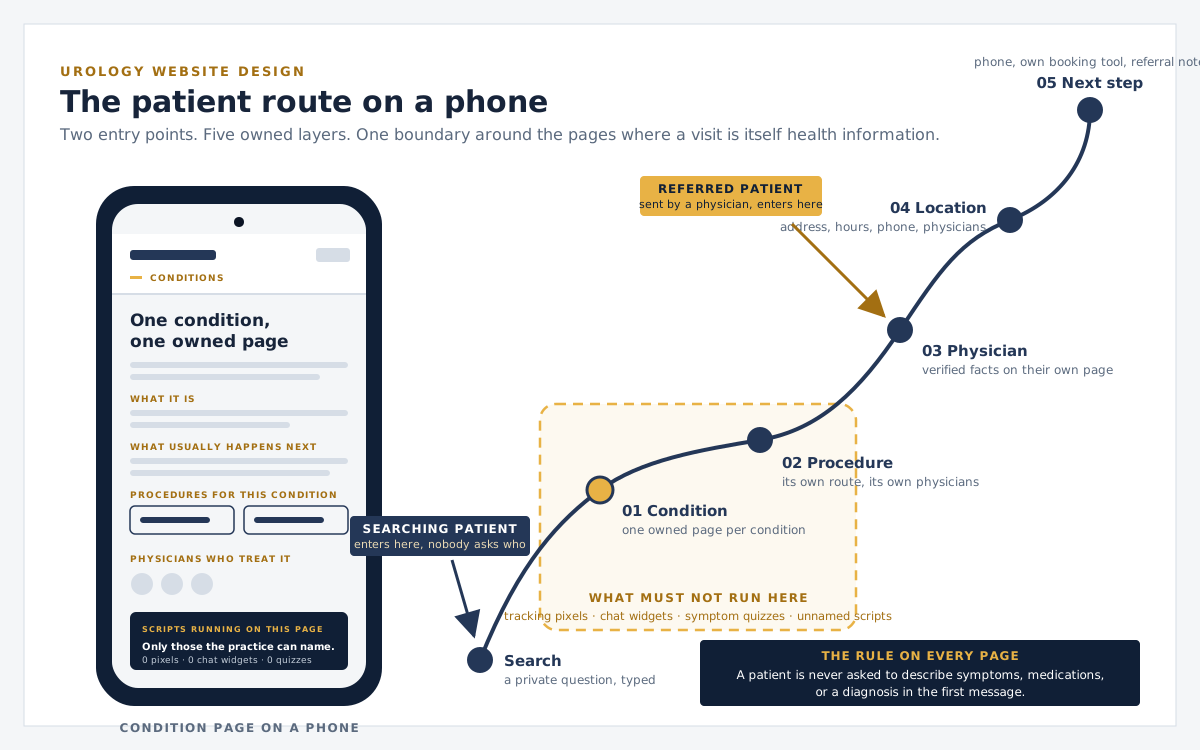
The route a urology patient takes through the site, with both entry points and the boundary around the pages where a visit is itself health information. Step through it further down.
Private question→Clear route→Accountable next step
What urology website design means
Design for the visitor who has not told anyone yet.
Urology website design is the structure of a practice's public site around the conditions, procedures, physicians, locations, and next steps a patient is trying to understand—built so that nobody has to disclose a private health concern before reaching an accountable channel. Three facts about urology patients decide most of that structure.
01
The question arrives before the diagnosis
Most urology visitors have not yet said the word out loud. Erectile dysfunction, incontinence, blood in the urine, a rising PSA, a vasectomy, a kidney stone at 2 a.m. The site is often the first place the question is typed, and the layout has to answer it without asking the visitor to identify themselves first.
02
Many patients are sent, not searching
A primary care physician or oncologist often makes the referral. Those patients arrive to check one thing: is this practice, this surgeon, and this location where I was told to go? Physician pages, hospital affiliations, and location routes have to confirm that in seconds.
03
The page a patient reads is itself sensitive
A visit to a prostate cancer page or an incontinence page is health information. Tracking pixels, chat widgets, symptom quizzes, and third-party scripts on those pages can carry that fact somewhere the practice never intended. What runs on a condition page is a design decision, not a marketing default.
The structure is the design
Condition, procedure, physician, location, next step.
Template galleries start from a homepage layout and ask the practice to fit inside it. A urology site is decided the other way around: by what the practice treats, who treats it, where, and what a patient should do next. Each layer is a real route with one owner.
01
Condition
One owned page per condition the practice actually treats, written from the patient's question outward: what it is, what usually happens next, and which procedures and physicians belong to it.
02
Procedure
Each procedure gets its own route with preparation, what the visit involves, recovery expectations, and the physicians who perform it. A hub page groups related procedures instead of burying them in one long scroll.
03
Physician
Credentials, training, hospital affiliations, publications, and the exact conditions and procedures each physician handles. Verified facts sit on their own page so marketing copy never has to carry them.
04
Location
Every office is a real route with address, parking, hours, phone, which physicians see patients there, and a Google Business Profile that matches the site word for word.
05
Next step
Phone, a booking tool the practice already operates, or a referral note. The rule on every page: a patient is never asked to describe symptoms, medications, or a diagnosis in the first message.
Walk the route
One patient, one phone, five layers in order.
Turn the phone and step through the route a patient actually takes: a private question typed into a search box, then condition, procedure, physician, location, and next step. At each stop the screen redraws that page type, and the readout says what the page must hold, what must not run on it, and where a patient is lost if that link is missing. Switch to a referred patient to see the route start at the physician page instead.
The patient route on a phone: two entry points, five owned layers, and the boundary around the pages where a visit is itself health information.
This walkthrough illustrates how the layers connect. It is not a patient tool: it asks nothing, stores nothing, and sends nothing.
Rebuild without losing referred patients
A urology redesign has to keep every route a referral already uses.
Primary care offices, oncologists, hospital directories, and Google Business Profiles already link to condition, physician, and location pages. A redesign that breaks those routes sends referred patients to a 404 at the moment they are checking whether they are in the right place.
01
Inventory every live condition, procedure, physician, and location URL, plus the referral links, hospital directories, and Google Business Profile entries that point at them.
02
Decide one owning URL for each condition and procedure before writing a word of replacement copy, so a rebuild does not create two prostate pages competing for one question.
03
Redirect one-to-one only where a true replacement exists. A retired physician page redirects to the physician index, not to the homepage.
04
Keep booking and phone routes identical across the release. A patient who bookmarked a location page must still land on that location.
05
After launch, verify canonicals, sitemap membership, response codes, rendered navigation, and every condition-to-procedure-to-physician route by hand.
Non-negotiable release boundaries
On a urology site, trust is what the page refuses to ask.
It has to be visible in which scripts run on a condition page, what the first message asks for, how every patient can operate the site, and which claims the practice declines to make without proof. The page-by-page script decision, with the HHS sources, is in the HIPAA-compliant website guide.
01
Privacy on sensitive pages
Condition and procedure pages run only the scripts the practice can name and justify. No symptom quizzes, no chat prompts asking what brings you in, and no form that invites a diagnosis before the destination, permissions, and accountable owner are verified.
02
Accessibility as a release check
Older patients, patients using screen readers, and patients reading on a phone in a waiting room are the audience. Keyboard access, focus visibility, contrast, labels, reading order, and plain language are tested before release, not promised in a sentence.
03
Security before polish
Any booking, portal, or staff route is protected on the server, integrations are constrained to what they need, and failure paths are tested. A clean interface is not evidence that a system is secure.
04
Claims the site refuses to make
No best urologist language, no success-rate promises, no ranking or traffic guarantees, and no HIPAA-compliance badge as a substitute for a real review. Education stays public; personalized guidance stays with the physician.
Before choosing any urology website vendor
Six questions that separate a structure from a template.
Ask these of any provider, including LA Digital Systems. The useful answers are lists, maps, and named owners—not reassurance.
01
Is this a template with our logo on it, or a structure built from our conditions, procedures, and physicians?
Template galleries start from a layout. A urology site has to start from what the practice treats and who treats it.
02
Which scripts, pixels, and chat tools will run on our condition pages, and can each one be named and removed?
A visit to a sensitive page is health information. The answer should be a list, not a reassurance.
03
What does the first patient message ask for, where does it go, and who is accountable for answering it?
If the answer includes symptoms or a diagnosis, the intake design is wrong before it is built.
04
Show us the redirect map for every existing condition, procedure, physician, and location URL.
A rebuild that loses referral links and directory listings costs patients the practice already had.
05
Who owns the domain, the code, the content, and the analytics account on day one and on the day we leave?
Ownership terms decide whether the practice can change vendors without rebuilding again.
06
Which accessibility checks run before release, and who reviews clinical copy before it is published?
Both belong to the build. Neither should be a line item added after launch.
One public urology implementation to inspect
Innovative Urology routes robotic surgery as a system, not a page.
Its robotic surgery hub links out to separate procedure routes for robotic prostatectomy, partial nephrectomy, cystectomy, and simple prostatectomy. Physician experience, publications, and hospital affiliations sit on their own pages instead of inside the marketing copy. Locations carry their own routes, booking runs through the practice's phone and scheduling tool, and the first-contact notice asks patients not to include medical information in an initial message. Trace those routes yourself.
The public structure of a urology practice: condition pages, procedure pages and hubs, physician pages with verified credentials, location pages that match the practice's Google Business Profile, and a next step that never asks a patient to disclose a diagnosis in the open. Visual design is one layer of that structure, not the whole of it.
02
Why is a urology website different from a general medical website?
The conditions are private, many patients arrive by referral rather than search, and the page a visitor reads is itself sensitive. That changes what the site asks for, which scripts run on condition pages, how physician proof is presented, and how the first contact is designed.
03
Do you build urology websites from templates?
No. Each site is built from the practice's actual conditions, procedures, physicians, and locations. A template decides the layout first and forces the practice into it; a urology site has to be decided by what the practice treats and who treats it.
04
Can a urology website include online booking or patient forms?
Yes, when the practice already operates a booking or intake system and its destination, permissions, retention, and accountable owner are verified. The design boundary is that the first message never asks for symptoms, medications, or a diagnosis. This page does not claim or certify HIPAA compliance for any site, vendor, or integration.
05
How is existing search visibility protected during a urology website rebuild?
By inventorying every live condition, procedure, physician, and location URL first, assigning one owning page to each intent, mapping only valid one-to-one redirects, keeping phone and booking routes unchanged, and verifying canonicals, sitemaps, links, and response codes after release.
06
What can a practice evaluate before an intake pathway is available?
The patient-first care model, the public healthcare digital system checklist, and the approved Innovative Urology example. Those steps support provider evaluation but do not create a consultation or service commitment.
Evaluate the system before the sales conversation
Use the same checks we use to inspect the work.
The public intake route remains intentionally unavailable while routing and operating boundaries are finalized. You can still evaluate how LA Digital Systems approaches urology website design, and the wider healthcare website development practice behind it, without submitting personal or medical information.